When projects hinge on tight timelines and cross‑functional input, the friction between document editing and scheduling can stall progress. Leveraging Google Docs together with Google Calendar transforms that friction into a seamless workflow, giving teams a single source of truth for both content and timing. The result is clearer responsibility, faster decision‑making, and a measurable boost in productivity.
Why do traditional tools hinder team coordination?
Most organizations rely on separate channels for file sharing and meeting planning. Emails attach files without context, while calendar invites list meeting times but seldom link directly to the agenda or supporting materials. This disjointed approach forces participants to hunt for the right document, often leading to missed updates or duplicated effort. The hidden cost appears as longer meetings, overlooked tasks, and a lingering sense that “something fell through the cracks.”
How does linking Google Docs to Calendar streamline collaboration?
Google Calendar allows a meeting invite to embed a live Google Doc link directly in the event description. When participants click the link, they see the most current version of the agenda, project plan, or brainstorming board without downloading attachments. Any changes made in the Doc are reflected instantly for everyone on the calendar, eliminating version confusion. Moreover, the “Add to Calendar” button within Docs lets authors schedule review milestones or deadline reminders right from the document itself.
Which features make the combined workflow a practical decision?
- Real‑time editing: Team members can comment, suggest, or edit simultaneously while the meeting is still open.
- Automated reminders: Calendar events can trigger email or mobile alerts when a document reaches a due date.
- Task integration: Using Google Tasks or the “Assign” feature in Docs, owners can be linked to specific action items that appear on their personal calendars.
- Version history tied to dates: The timestamped revisions in Docs line up with calendar events, making it easy to trace who contributed what before each meeting.
What steps should a team take to adopt this workflow today?
- Identify a recurring meeting that relies on shared documents (e.g., weekly sprint planning).
- Create the master Google Doc for the agenda and embed a table of contents that links to each section.
- Open the corresponding Google Calendar event, paste the Doc URL into the description, and enable “Add conferencing” if video is required.
- Assign owners to key action items using the “Comment + Assign” feature; these assignments automatically appear on each participant’s calendar as tasks.
- After the meeting, update the Doc with decisions, then use the “Create event” shortcut in Docs to schedule the next review date.
What outcomes can organizations anticipate?
Teams that embed Google Docs within Calendar report a reduction in meeting preparation time of 20‑30 percent, because participants no longer need to locate the latest version of the agenda. The transparent link between tasks and dates also cuts missed deadlines, as reminders are automatically generated from the same platform that houses the work. Ultimately, the integrated approach fosters a culture where information is always current and accountability is built into the schedule, unlocking the team’s potential to deliver faster and more predictably.
Эл схема нива 21213 карбюратор | Obrezka.com
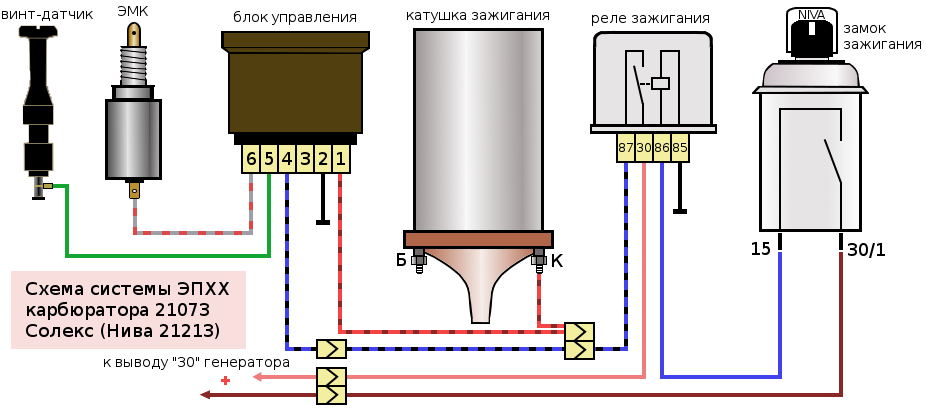
Эл схема нива 21213 карбюратор | Obrezka.com